
HIGHLANDER TOOLS FOR INDESIGN
A suite of tools to accelerate your InDesign workflows
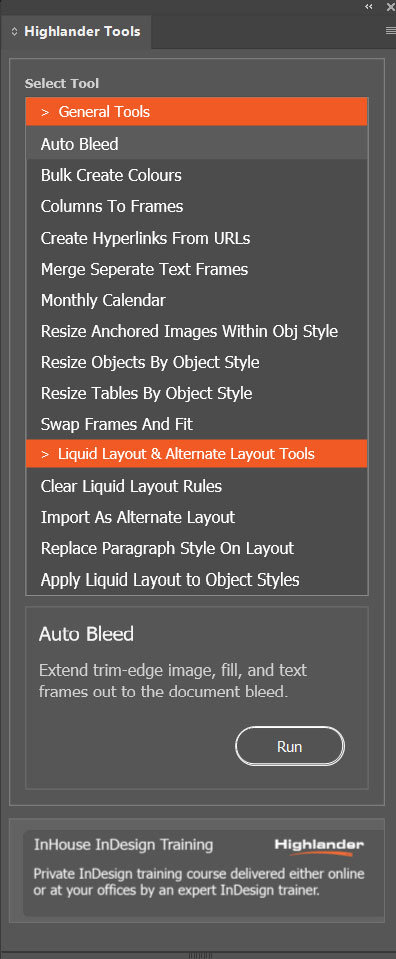
Highlander Tools is a collection of productivity-enhancing utilities designed to simplify common Adobe InDesign tasks and improve day-to-day efficiency.
Rather than relying on multiple scripts, manual workarounds, or repetitive processes, Highlander Tools brings together a range of practical functions in a single, easy-to-use plugin. Whether you are creating calendars, generating hyperlinks, managing swatches, resizing content, adjusting layouts, or cleaning up documents, Highlander Tools helps you complete tasks faster and with greater consistency.
Designed for designers, marketing teams, communications professionals, bid teams, and in-house publishing departments, the plugin focuses on solving real production challenges rather than adding unnecessary complexity. Each tool has been created to save time, reduce errors, and improve workflow efficiency.
Key Benefits
- Save time on repetitive production tasks
- Improve consistency across documents
- Reduce manual editing and formatting
- Automate common InDesign workflows
- Simple to use with no scripting knowledge required
- Continually expanded with new productivity tools
Developed by Highlander Training, a specialist Adobe training provider with over 25 years of experience, Highlander Tools reflects the practical workflows and challenges encountered by real-world InDesign users every day.

Create Professional Calendars in Seconds
Creating calendars manually in Adobe InDesign can be time-consuming and prone to formatting errors. The Calendar Generator automates the entire process, creating fully formatted calendars directly within your document.
Choose custom date ranges, define the start day of the week, and automatically generate calendars complete with table styles, paragraph styles, swatches, and formatting options. Whether you need a simple monthly calendar or a complex multi-month layout, the Calendar Generator can save hours of manual work.
Key Benefits
- Generate calendars for any date range
- Automatically create supporting styles and swatches
- Consistent formatting throughout the document
- Save significant production time
- Ideal for planners, brochures, newsletters and publications
Create Multiple Colour Swatches Instantly
Adding large numbers of colour swatches manually can be a repetitive and frustrating task. The Colour Swatch Generator allows you to create multiple swatches in a single operation using industry-standard colour values.
Simply paste or enter colour values and Highlander Tools will generate the corresponding swatches automatically. CMYK, RGB, HEX and LAB colour formats are all supported, making it easy to work with brand guidelines, design systems and externally supplied colour specifications.
Key Benefits
- Create multiple swatches at once
- Supports CMYK, RGB, HEX and LAB values
- Reduces manual data entry
- Improves accuracy and consistency
- Ideal for brand and corporate documents


Automatically Create Hyperlinks from URLs
Manually converting website addresses into hyperlinks can be a tedious process, especially in long documents containing dozens or hundreds of links. The Hyperlink Generator automatically identifies URLs and converts them into fully functional InDesign hyperlinks.
This can dramatically reduce the time required to prepare interactive PDFs, digital publications and online documents while helping to ensure consistency and accuracy.
Key Benefits
- Automatically detects website addresses
- Creates InDesign hyperlinks instantly
- Saves time in large documents
- Reduces missed or incorrect links
- Perfect for interactive PDFs and digital publications
Getting Highlander Tools
Highlander Tools for Adobe InDesign is available with a free 30 day trial, allowing you to explore all of the included productivity tools before making a purchase. After the trial period a licence can be purchased for just £45 / year, which includes support and updates.
To get started, simply download the plugin using the button below and double-click the CCX file to install it. Once installed, launch InDesign and choose About Highlander Tools from the Highlander Tools menu to start your free trial or activate a purchased licence through our licensing partner, Lemon Squeezy.
To install the tools click the link below and then double click the downloaded plugin file to install it. When you reopen InDesign you should then see the Highlander Tools menu. Open the panel to licence / activate the Highlander Tools plugin.
Get Highlander ToolsTELL OTHERS
If you find these free tools useful please let others know and feel free to link to this page.