
InDesign Beginners
On-Demand Video Course
£95.00
Associated Courses
6 months unlimited access
Learn from the experts at Highlander!
Learn InDesign at your own speed.
If you're looking to enhance your design skills with a flexible and accessible learning format, this online InDesign course is perfect for you. Unlike traditional in-person training, this on-demand video course allows you to learn at your own pace, revisit lessons whenever you need, and fit your education around a busy schedule Designed for complete beginners this course contains over 6 hours of detailed video tutorials, taking you through all of the core features of InDesign and getting you up to speed in no time at all.Why take this course
Whether you're aiming to boost your career prospects, create stunning layouts, or edit existing content, this course covers all the essentials. From typography and colour management to outputting for both print and digital use, you'll gain practical knowledge that translates directly into real-world design scenarios.
By the end of this course, you'll feel confident using Adobe InDesign, ready to tackle projects ranging from marketing and communications materials through to creating books or magazines, all from the comfort of your own machine.
Skills worth having
Understand core layout concepts
Discover the essentials of layout and design using Adobe InDesign. You’ll learn how to navigate the interface, set up new documents, and explore the basic tools. Understand important concepts like bleed, slug and margins, and learn how to navigate around within your document.Master text in InDesign
Typography can make or break your design. Our InDesign course delves into text formatting tools, from choosing fonts and adjusting kerning to using paragraph and character styles. You’ll learn how to create professional text layouts, manage long-form text with threaded text frames, and bring your editorial designs to life.Working with images
InDesign isn’t just about text, it’s also a powerful tool for incorporating graphics. We teach you how to place and manipulate images with precision. You’ll explore how to use the Links panel effectively, apply fitting options, and gain a strong understanding of concepts like resolution and file types.Grids, Guides, and Alignment
Consistency is key to professional design. This module covers using grids, guides, and alignment tools to create balanced, aesthetically pleasing layouts. You’ll learn how to create multi-column layouts, snap objects into place, and maintain symmetry throughout your designs, ensuring your work looks polished and professional.Sample video from the course
Advanced Formatting with Text Styles
Discover how to use InDesign’s powerful text styles to boost your productivity. You’ll master paragraph & character styles, learning how to apply consistent formatting across your documents in just a few clicks. This feature is a game-changer for efficiency and professional design quality.Get to grips with Parent Pages
When working on multi-page documents like magazines, brochures, or reports, parent pages are invaluable. We’ll show you how to create and apply parent pages to maintain consistent design elements such as headers, footers, and page numbers. This skill will save you hours of manual adjustments and keep your documents looking sharp.Creating colour swatches
Learn how to manage colours effectively within InDesign. From setting up new colour swatches through to working with gradients, this module ensures your designs are vibrant and consistent. You will learn how to sample colours from images using the colour theme tool to create colour swatches from your images.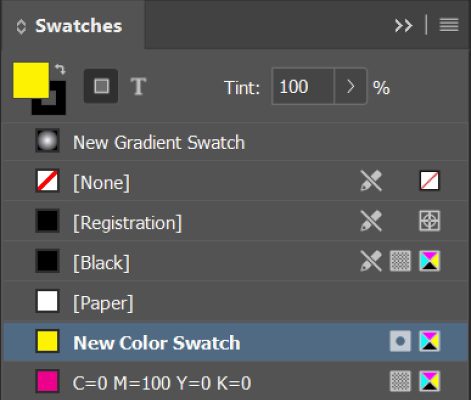
Tackling Tables
Tables are a powerful tool for displaying data in an organized and attractive way, and during the course you’ll learn how to create, format, and style tables in InDesign. From adjusting cell sizes and borders to applying table styles, InDesign is a great tool for creating reports, menus, and any design that requires structured data presentation.
Exporting and Preflighting
Nothing is worse than an error on a finished project, particularly a print project. You’ll learn how to use InDesign’s preflight tools to catch potential issues early. We then cover exporting to various formats, including both print-ready PDFs and digital PDFs, with optimal settings for quality and file size. You’ll gain the confidence to deliver flawless files every time.In addition you will
- Master the art of linking text frames to flow content seamlessly across multiple pages, perfect for creating professional multi-page documents like magazines and brochures.
- Learn how to create and style bulleted and numbered lists, ensuring your documents present information clearly and maintain consistent formatting throughout.
- Discover how to rotate, skew, and apply rounded corners to frames, adding dynamic and creative elements to your design layouts.
- Use the Gap Tool to easily adjust spacing between objects without altering their size, helping you maintain perfect alignment and spacing in your layouts.
- Apply and customize shadows, glows, and embossing to add depth and dimension to objects and text. Master the use of transparency and feathering to create layered, professional designs with dynamic visual impact. Experiment with creative effects while maintaining a polished, professional aesthetic across all your projects.

Volume licences
Looking multi user access? We offer discounts for more than one users, just message us through the contact form here and let us know how many users. Contact us for details
No risk guarantee
Curious whether to choose face-to-face training or try our pre-recorded course? If you're not completely satisfied with the pre-recorded option, you can switch to the live online version at any stage, and we'll deduct what you paid for the pre-recorded course from the total cost.Feedback from our past InDesign students
(including from live classes)
Really well run course and well taught. Works well online.
About the course instructor
This course is produced by Andy Gardiner, a PGCE (Level 7) qualified teacher and CompTIA Certified Technical Trainer with over 25 years of experience working with Adobe Creative Cloud. Andy has delivered training to some of the world’s best-known organisations and spent more than a decade as an Adobe Certified Instructor. He is also a published author, having written about Adobe technologies for leading publisher Packt.

The course is carefully structured to teach you the skills needed in a logical order. You start with basic InDesign skills like customizing the interface, opening and closing panels, and setting up new documents, before advancing to work with parent pages, apply styles, manage text and image frames, use grids and guides, and more.
Start Right Now
£95.00
Associated Courses
About the Instructor
Andy Gardiner is an Adobe Certified Design Master, a CompTIA Certified Technical Trainer, and a PGCE (Level 7) qualified teacher with over 20 years’ experience delivering training across the Adobe Creative Cloud suite. He was also an Adobe Certified Instructor for over a decade.
He is the author of Designing the Adobe InDesign Way (Packt Publishing), and has earned 20 Adobe Certified Expert accreditations, reflecting his deep expertise across the Adobe CC product range.